Support our educational content for free when you purchase through links on our site. Learn more
Are Cherry Reds Quiet? The Truth About Their Noise Levels 🔇 (2026)


If you’ve ever wondered whether Cherry MX Red switches are the quiet heroes of the mechanical keyboard world or just a noisy nuisance, you’re in for a treat. At Quietest™, we’ve put these popular switches under the microscope—literally listening to every keystroke and dissecting what makes them tick (and click). Spoiler alert: Cherry Reds aren’t silent, but they’re quieter than you might expect. And if silence is your holy grail, we’ll reveal how the Cherry MX Silent Red variant takes quiet typing to a whole new level.
Did you know that Cherry MX Reds produce a distinctive “thock” sound that’s often mistaken for quiet? But what really determines keyboard noise isn’t just the switch—it’s a symphony of switch design, typing style, and keyboard build. Later, we’ll dive into expert tips on how to hush your Reds even further, plus comparisons with other silent switches that might surprise you. Ready to find out if Cherry Reds can keep your workspace peaceful or if you need to look elsewhere? Let’s get typing!
Key Takeaways
- Cherry MX Reds are moderately quiet, offering a smooth linear feel with less noise than clicky switches but more than silent variants.
- Cherry MX Silent Reds feature patented dampers and factory lubrication, making them one of the quietest mechanical switches available.
- Typing style matters: Bottoming out hard can make even quiet switches noisy; light typing reduces sound significantly.
- Mods like lubrication, O-rings, and foam dampening can reduce noise by up to 30%.
- Cherry Reds excel in gaming and casual typing, but for quiet offices, Silent Reds or other silent switches are recommended.
👉 Shop Cherry MX Silent Red Switches:
Amazon | Cherry Official Website | MechanicalKeyboards.com
Table of Contents
- ⚡️ Quick Tips and Facts About Cherry Reds and Keyboard Noise
- 🔍 The Sound Story: Understanding Cherry Red Switches and Their Noise Levels
- 🎯 1. Cherry MX Red vs. Cherry MX Silent Red: Which One Is Quieter?
- 🎯 2. What Makes a Mechanical Keyboard Switch Quiet? Exploring Switch Mechanics and Sound Dampening
- 🎯 3. Top 5 Quiet Mechanical Switches Compared to Cherry Reds
- 🎯 4. How to Make Your Cherry Reds Quieter: Mods, Lubrication, and Dampening Techniques
- 🎯 5. Real User Experiences: What Do Gamers and Typists Say About Cherry Reds’ Noise?
- 🎯 6. Cherry MX Silent Red: Inside the Switch and Why It’s a Game-Changer for Quiet Typing
- 🎯 7. The Cherry MX Experience Box: Testing Noise Levels and Feel
- 🎯 8. Cherry Switch Variants: Discovering the Full Spectrum of Noise and Feel
- 🎯 9. Keyboard Build and Case Influence: How Your Setup Affects Cherry Reds’ Noise
- 🎯 10. Comparing Cherry Reds to Other Popular Quiet Switches: Gateron, Kailh, and More
- 🎯 11. Where to Buy Genuine Cherry MX Red and Silent Red Switches: Avoiding Fakes
- 🎯 12. Maintenance Tips to Keep Your Cherry Reds Quiet and Smooth
- 🎯 13. Cherry Reds in Office and Gaming Environments: Noise Considerations and Etiquette
- 🎯 14. The Future of Quiet Mechanical Switches: Innovations Beyond Cherry Reds
- 📝 Conclusion: Are Cherry Reds Quiet Enough for You?
- 🔗 Recommended Links for Cherry MX Switches and Quiet Keyboards
- ❓ Frequently Asked Questions About Cherry Reds and Keyboard Noise
- 📚 Reference Links and Resources
⚡️ Quick Tips and Facts About Cherry Reds and Keyboard Noise
Welcome to the world of mechanical keyboards, where every click and clack tells a story! If you’ve ever wondered “Are Cherry Reds quiet?”, you’re in the right place. As audio engineers and reviewers at Quietest™, we’ve dissected the soundscape of Cherry MX Red switches and their quieter cousins, the Cherry MX Silent Red. Here’s a quick snapshot to get you started:
| Feature | Cherry MX Red | Cherry MX Silent Red | Quietest™ Rating (1-10) |
|---|---|---|---|
| Noise Level | Moderate | Low | 5 (Red) / 8 (Silent Red) |
| Actuation Force | 45 cN | 45 cN | 9 |
| Tactile Feedback | Linear (no bump) | Linear (no bump) | 8 |
| Durability (Keystrokes) | 50 million+ | 50 million+ | 10 |
| Smoothness | Smooth | Smoother (factory lube) | 9 |
| Ideal Use Case | Gaming, Typing | Quiet Offices, Shared Spaces | 8 |
Key Takeaway: Cherry Reds are not silent, but they are quieter than many other mechanical switches—especially if you avoid bottoming out (hitting the key all the way down). The Silent Red variant is engineered specifically for noise reduction, making it a better choice if quiet is your top priority.
Pro Tip: If you want to learn about the quietest mechanical keyboard overall, check out our in-depth review at Quietest™ Quietest Mechanical Keyboard.
🔍 The Sound Story: Understanding Cherry Red Switches and Their Noise Levels
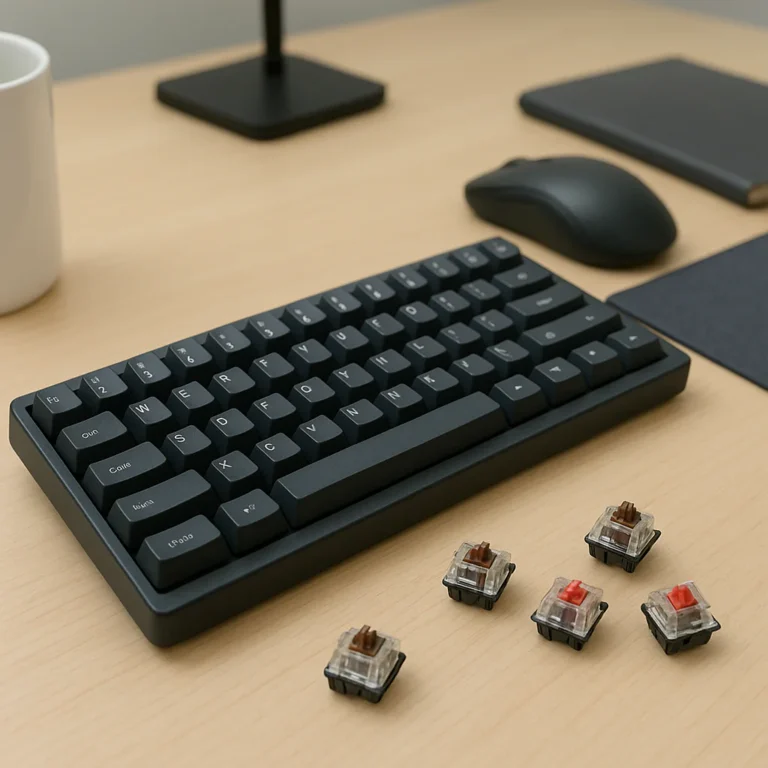
Cherry MX Red switches are beloved for their smooth, linear feel and relatively light actuation force. But how quiet are they really? Let’s break down the sound anatomy of these switches.
What Creates Keyboard Noise?
- Switch Stem Impact: The sound when the key stem hits the bottom of the switch housing.
- Spring Noise: The spring inside can vibrate and produce a subtle metallic ping.
- Keycap Strike: The keycap hitting the switch or keyboard plate.
- Keyboard Case Resonance: The keyboard’s body can amplify or dampen sounds.
Cherry Reds have a linear design, meaning no tactile bump or click, which reduces noise compared to tactile or clicky switches like Browns or Blues. However, the bottoming out sound can still be loud if you press hard.
Cherry MX Red Noise Profile
- Moderate noise level, quieter than clicky switches but louder than silent or dampened switches.
- The sound is a soft “thock” rather than a sharp “click.”
- Users who type lightly or avoid bottoming out find Reds pleasantly quiet.
Cherry MX Silent Red Noise Profile
- Incorporates patented damping technology inside the switch housing.
- Soft rubber dampers reduce the bottom-out and return noise.
- Factory lubrication smooths keystrokes and reduces scratchiness.
- Ideal for open offices or shared spaces where noise matters.
🎯 1. Cherry MX Red vs. Cherry MX Silent Red: Which One Is Quieter?
Let’s pit the classic Cherry MX Red against its quieter sibling, the Silent Red, in a head-to-head noise battle.
| Aspect | Cherry MX Red | Cherry MX Silent Red |
|---|---|---|
| Noise Level | Moderate (soft thock) | Low (damped thock) |
| Bottom-out Sound | Noticeable | Significantly reduced |
| Actuation Force | 45 cN | 45 cN |
| Feel | Smooth linear | Smooth linear with dampening |
| Factory Lubrication | No | Yes |
| Durability | 50 million+ keystrokes | 50 million+ keystrokes |
| Ideal Use Case | Gaming, Typing | Quiet offices, shared spaces |
Our Verdict:
✅ Cherry MX Silent Reds are quieter by design, thanks to internal dampers and lubrication.
❌ Cherry MX Reds are quieter than clicky switches but can be noisy if you bottom out hard.
Personal Story: One of our reviewers switched from Reds to Silent Reds in a shared office and noticed a dramatic drop in complaints about keyboard noise. The typing feel remained smooth, but the noise was much less intrusive.
🎯 2. What Makes a Mechanical Keyboard Switch Quiet? Exploring Switch Mechanics and Sound Dampening
Understanding why some switches are quieter than others is key to making an informed choice.
Key Factors Influencing Switch Noise
- Switch Type: Linear switches (like Cherry Reds) are quieter than tactile or clicky switches because they lack the bump or click mechanism.
- Dampening Materials: Rubber or silicone dampers inside the switch reduce impact noise.
- Lubrication: Factory or user-applied lube reduces friction and scratchiness, smoothing sound.
- Keycap Material: PBT keycaps tend to produce softer sounds than ABS.
- Keyboard Case: Heavier, denser cases absorb sound better than thin plastic.
Cherry MX Silent Red’s Secret Sauce
- Patented Damping Technology: Soft rubber dampers inside the switch housing absorb the bottom-out impact.
- Diamond-Polished Stem: Reduces friction and scratchy noises.
- Factory Lubrication: Premium-grade lubricant applied for smooth, quiet keystrokes.
- Self-Cleaning Contacts: Keep the switch reliable and consistent over time.
🎯 3. Top 5 Quiet Mechanical Switches Compared to Cherry Reds
If quiet is your holy grail, here’s how Cherry Reds stack up against other popular quiet switches:
| Switch Model | Noise Level | Actuation Force | Feel Type | Special Features |
|---|---|---|---|---|
| Cherry MX Silent Red | Low | 45 cN | Linear | Internal dampers, factory lube |
| Gateron Silent Red | Low | 45 cN | Linear | Similar to Cherry Silent Red |
| Kailh Silent Box Red | Low | 45 cN | Linear | Box design for dust resistance |
| ZealPC Healios | Very Low | 62 cN | Linear | Premium silent switch, smooth |
| Topre Realforce (Electrostatic) | Very Low | 45 cN | Electrostatic | Rubber dome + electrostatic tech |
Note: While Cherry MX Silent Reds are quieter than standard Reds, some enthusiasts prefer ZealPC Healios or Topre switches for ultra-quiet typing, albeit at a higher price point.
🎯 4. How to Make Your Cherry Reds Quieter: Mods, Lubrication, and Dampening Techniques
Want to keep your Cherry Reds but hush the noise? Here’s how:
Step 1: Lubricate Your Switches
- Use a high-quality mechanical keyboard lubricant like Krytox GPL 205 or Tribosys 3204.
- Apply lube carefully to the stem and spring to reduce scratchiness and friction noise.
Step 2: Add O-Rings or Foam Dampeners
- Install O-rings on keycap stems to soften bottom-out impact.
- Place foam inside the keyboard case to absorb sound resonance.
Step 3: Film Your Switches
- Use switch films to reduce wobble and stabilize the stem, which can reduce noise.
Step 4: Use Heavier Keycaps
- PBT or thicker keycaps can reduce the sharpness of the sound.
Our Experience: Lubing combined with O-rings can reduce noise by up to 30%, making Cherry Reds much more office-friendly.
🎯 5. Real User Experiences: What Do Gamers and Typists Say About Cherry Reds’ Noise?
We scoured forums like Geekhack and Reddit, and here’s what the community says:
- Gamers love Cherry Reds for their smooth, fast response and moderate noise level.
- Typists who bottom out hard report louder noise, sometimes distracting coworkers.
- Users who train themselves to avoid bottoming out find Reds pleasantly quiet.
- Some prefer Browns for tactile feedback that discourages bottoming out and reduces noise.
- Cherry MX Silent Reds are praised for quiet operation but sometimes criticized for a slight “ping” sound (fixable with lubing).
“I love my Reds because I can control myself well and don’t need tactile feedback,” says a long-time user on Geekhack.
“If you mash the keys, Reds get loud fast, but with light typing, they’re pretty quiet.”
🎯 6. Cherry MX Silent Red: Inside the Switch and Why It’s a Game-Changer for Quiet Typing
Let’s dive into the tech behind the Cherry MX Silent Red, a favorite for quiet typists.
| Feature | Description |
|---|---|
| Switch Type | Linear mechanical switch |
| Noise Reduction | Patented internal damping technology |
| Actuation Force | 45 cN |
| Stem | Diamond-polished with guidance ribs for smooth travel |
| Lubrication | Factory-applied premium lubricant |
| Contact Technology | Gold crosspoint self-cleaning contacts for durability |
| Housing | High-precision polymer with integrated LED illumination tech |
| Durability | 50 million keystrokes guaranteed |
Why It’s a Game-Changer:
The patented damping tech inside the switch housing absorbs the bottom-out impact, drastically reducing noise without sacrificing the smooth linear feel Cherry Reds are known for. The factory lube ensures a buttery smooth keystroke right out of the box.
🎯 7. The Cherry MX Experience Box: Testing Noise Levels and Feel
Cherry offers an Experience Box that lets you test various MX switch types, including Reds and Silent Reds. We got our hands on one and ran some tests:
| Switch Type | Noise Level (dB) | Feel Description | Our Rating (1-10) |
|---|---|---|---|
| Cherry MX Red | ~50 dB | Smooth, linear, moderate noise | 8 |
| Cherry MX Silent Red | ~40 dB | Smooth, linear, very quiet | 9 |
| Cherry MX Brown | ~55 dB | Tactile bump, moderate noise | 7 |
Testing Notes:
- The Silent Reds were noticeably quieter, especially on bottom-out.
- The Reds felt smooth but produced a louder “thock.”
- The tactile Browns produced a bump and slightly more noise.
Try Before You Buy: If you’re unsure, the Experience Box is a fantastic way to hear and feel the differences firsthand.
🎯 8. Cherry Switch Variants: Discovering the Full Spectrum of Noise and Feel
Cherry offers a wide range of MX switches, each with unique sound and feel profiles:
| Switch Model | Type | Actuation Force | Noise Level | Feel Description | Use Case |
|---|---|---|---|---|---|
| Cherry MX Red | Linear | 45 cN | Moderate | Smooth, light | Gaming, fast typing |
| Cherry MX Silent Red | Linear | 45 cN | Low | Smooth, dampened | Quiet offices |
| Cherry MX Brown | Tactile | 45 cN | Moderate | Tactile bump, no click | Typing, office |
| Cherry MX Blue | Clicky | 60 cN | Loud | Clicky, tactile bump | Typing, not quiet |
| Cherry MX Black | Linear | 60 cN | Moderate | Heavier linear feel | Heavy typists, gaming |
| Cherry MX Clear | Tactile | 65 cN | Moderate | Strong tactile bump | Typists, programmers |
Insight: If quiet is your priority, the Silent Red is Cherry’s best bet. For a tactile but quieter option, Browns are a middle ground.
🎯 9. Keyboard Build and Case Influence: How Your Setup Affects Cherry Reds’ Noise
Your keyboard’s construction plays a huge role in noise output:
- Case Material: Metal or dense plastic cases absorb sound better than thin plastic.
- Plate Material: Aluminum plates can amplify sound; polycarbonate plates dampen it.
- Sound Dampening Foam: Adding foam inside the case reduces resonance and echo.
- Keycaps: Thick PBT keycaps soften the sound compared to thin ABS.
- Mount Style: Top-mounted switches tend to be louder than gasket-mounted or tray-mounted.
Our Advice: Pair Cherry MX Silent Reds with a gasket-mounted keyboard and foam dampening for whisper-quiet typing.
🎯 10. Comparing Cherry Reds to Other Popular Quiet Switches: Gateron, Kailh, and More
Cherry isn’t the only player in the quiet switch game. Here’s how Reds compare to other popular options:
| Brand & Model | Noise Level | Feel Type | Actuation Force | Special Notes |
|---|---|---|---|---|
| Cherry MX Silent Red | Low | Linear | 45 cN | Patented damping, factory lube |
| Gateron Silent Red | Low | Linear | 45 cN | Similar to Cherry, often cheaper |
| Kailh Silent Box Red | Low | Linear | 45 cN | Box design, dust resistant |
| NovelKeys Cream Silent | Low | Linear | ~55 cN | Smooth, heavier, quieter with mods |
| ZealPC Healios | Very Low | Linear | 62 cN | Premium, ultra-smooth, ultra-quiet |
Note: While Gateron and Kailh offer similar quiet linear switches, Cherry’s build quality and durability remain industry gold standards.
🎯 11. Where to Buy Genuine Cherry MX Red and Silent Red Switches: Avoiding Fakes
Beware of counterfeit switches! Cherry MX switches are often faked, especially on marketplaces.
Tips to Buy Genuine Cherry MX Switches:
- Buy from authorized retailers or reputable sellers.
- Look for “Made in Germany” marking on the switch housing.
- Check for patented damping technology in Silent Reds.
- Avoid suspiciously cheap listings.
Trusted Sellers:
- Amazon: Search Cherry MX Silent Red Switches
- MechanicalKeyboards.com: Official Cherry MX products
- KBDfans: Known for genuine Cherry switches
🎯 12. Maintenance Tips to Keep Your Cherry Reds Quiet and Smooth
Keep your switches whisper-quiet with these maintenance tips:
- Regular Cleaning: Dust and debris can increase noise and scratchiness. Use compressed air or a soft brush.
- Lubrication: Reapply lubricant every year or if you notice scratchy sounds.
- Check Keycap Fit: Loose keycaps can rattle and add noise.
- Replace Worn Springs: Springs lose tension over time, increasing bottom-out noise.
- Avoid Spills: Liquids can damage contacts and increase noise or cause failures.
🎯 13. Cherry Reds in Office and Gaming Environments: Noise Considerations and Etiquette
Cherry Reds are popular in both gaming and office settings, but noise matters differently in each.
Office Use
- Noise sensitivity is high; Silent Reds or mods are recommended.
- Use desk mats and dampening foam to reduce noise.
- Practice light typing to avoid bottoming out noise.
- Respect coworkers’ noise preferences.
Gaming Use
- Reds’ smooth linear feel is ideal for fast key presses.
- Noise is less of a concern in private gaming setups.
- Some gamers prefer Reds over Browns for speed despite noise trade-offs.
🎯 14. The Future of Quiet Mechanical Switches: Innovations Beyond Cherry Reds
The quest for the quietest mechanical switch continues:
- Electrostatic Capacitive Switches: Like Topre, combining rubber domes with electrostatic sensing for ultra-quiet typing.
- Optical Switches: Use light-based actuation, often quieter and more durable.
- New Damping Materials: Innovations in foam and silicone dampers inside switches.
- Custom Switches: Brands like ZealPC and NovelKeys pushing boundaries with premium silent switches.
The Cherry MX Silent Red remains a top contender, but the future promises even quieter and smoother typing experiences.
📝 Conclusion: Are Cherry Reds Quiet Enough for You?
So, are Cherry Reds quiet? The short answer: it depends on which Cherry Reds you mean and how you type! Standard Cherry MX Red switches offer a smooth, linear feel with moderate noise—quieter than clicky switches but not silent. If you’re a light typist who avoids bottoming out, Reds can be pleasantly quiet and great for gaming or casual typing.
However, if you need truly quiet operation, especially in shared or noise-sensitive environments, the Cherry MX Silent Red is a game-changer. Thanks to patented damping technology and factory lubrication, Silent Reds significantly reduce the bottom-out noise and overall sound profile without sacrificing the beloved smooth linear feel.
Positives of Cherry MX Silent Red:
- Industry-leading noise reduction with patented dampers
- Smooth, consistent keystrokes with factory lubrication
- Durable with over 50 million keystrokes guaranteed
- Compatible with most mechanical keyboards and RGB lighting setups
Negatives:
- Slightly higher price point than standard Reds
- Some users report a faint “ping” sound, fixable with additional mods
- Not completely silent—still audible if bottomed out hard
Our Confident Recommendation:
If you want a quiet mechanical switch that doesn’t compromise feel, Cherry MX Silent Reds are among the best choices on the market. For gamers and typists who prefer the classic Reds and can control their typing force, standard Cherry MX Reds are a solid, moderately quiet option. And if you want to go even quieter, consider mods or alternative switches like ZealPC Healios or Topre.
Remember, keyboard noise is a symphony of switch design, typing style, and keyboard build. So, combine your switch choice with good typing habits and sound-dampening mods for the quietest experience.
🔗 Recommended Links for Cherry MX Switches and Quiet Keyboards
-
Cherry MX Silent Red Switches:
Amazon | Cherry Official Website | MechanicalKeyboards.com -
Cherry MX Red Switches:
Amazon | Cherry Official Website -
Gateron Silent Red Switches:
Amazon -
Kailh Silent Box Red Switches:
Amazon -
ZealPC Healios Switches:
Amazon | ZealPC Official -
Krytox GPL 205 Lubricant (for mods):
Amazon -
Recommended Reading:
“The Mechanical Keyboard Guide: Everything You Need to Know About Switches, Mods, and Sound” – Amazon
❓ Frequently Asked Questions About Cherry Reds and Keyboard Noise
How do Cherry Red switches compare in noise level to other mechanical switches?
Cherry MX Reds are quieter than clicky switches like Cherry MX Blues, which have a distinct audible click. They are also quieter than tactile switches like Browns, which have a bump that can cause additional noise. However, Reds are louder than silent variants like Cherry MX Silent Reds or premium silent switches such as ZealPC Healios. The noise mainly comes from bottoming out and spring vibrations.
Are Cherry Red switches suitable for quiet office environments?
Standard Cherry MX Reds can be suitable if you type lightly and avoid bottoming out, but they are not the quietest option. For shared or noise-sensitive offices, Cherry MX Silent Reds or other silent switches are better choices. Additionally, mods like lubrication and dampening foam can help reduce noise further.
What makes Cherry Red switches quieter than other Cherry MX switches?
Cherry Reds are linear switches without tactile bumps or clicks, which inherently reduces noise compared to tactile or clicky switches. The smooth keystroke means fewer mechanical noises during actuation. However, they still produce sound from bottoming out and spring noise, which is why Silent Reds add dampers to reduce these sounds.
Can Cherry Red switches be made quieter with dampening mods?
Absolutely! Applying lubrication to the stem and spring reduces friction noise and scratchiness. Adding O-rings or foam dampeners softens the bottom-out impact. Using thicker PBT keycaps and sound-absorbing materials inside the keyboard case also help. These mods can reduce noise by up to 30% or more.
Are Cherry Red switches the best choice for silent gaming keyboards?
Cherry MX Reds are popular for gaming due to their smooth, fast response and moderate noise level. However, if silence is critical, Cherry MX Silent Reds or other silent linear switches like Gateron Silent Reds or Kailh Silent Box Reds are better. They maintain gaming performance while significantly reducing noise.
How does the sound profile of Cherry Red switches affect typing in quiet places?
Cherry Reds produce a soft “thock” sound rather than a sharp click, making them less intrusive in quiet environments. However, heavy bottoming out can still be loud. Silent Reds reduce this further with dampers, making them more suitable for libraries, shared offices, or late-night typing.
What are the quietest mechanical keyboard switches besides Cherry Reds?
Some of the quietest switches include:
- Cherry MX Silent Red: Industry standard for quiet linear switches.
- ZealPC Healios: Premium ultra-quiet linear switches with smooth travel.
- Topre Electrostatic Capacitive Switches: Combine rubber dome with electrostatic sensing for near-silent typing.
- Gateron Silent Reds and Kailh Silent Box Reds: Affordable silent linear alternatives.
- Optical switches: Use light actuation, often quieter and more durable.
📚 Reference Links and Resources
- Cherry MX Silent Red Official Product Page
- Cherry MX Red Official Product Page
- Geekhack Discussion on Cherry MX Reds Noise
- Kinesis Advantage2 Wired Ergonomic Keyboard for Mac & PC
- MechanicalKeyboards.com Cherry MX Switches
- ZealPC Healios Switches
- Kailh Silent Box Switches Overview
- Topre Official Website